Contact the Digital AI Team
Contact the Emory Digital AI team using one of the options below. Requests associated with Emory Healthcare email should follow the detailed instructions provided below. Emory Healthcare and University team members who are unable to request via Service Now can use this link with their Emory credentials to reach the Emory Digital Team.
Emory Healthcare Team Members
Step 1:
EHC team members use this link to submit a request to the AI team.
Step 2:
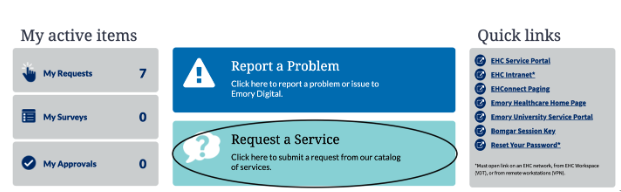
After logging in click on “Request a service” as shown below
Step 3:
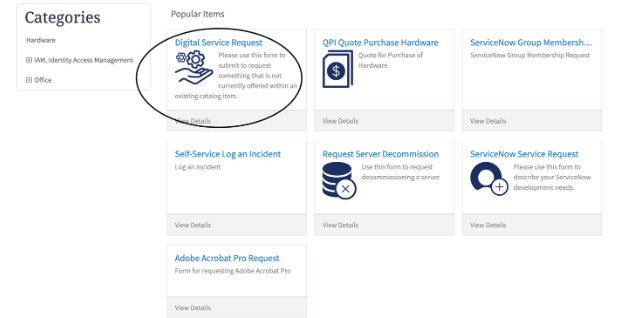
In the “Request a service page”, please click on “Digital Service request” as shown in the following image.
Step 4:
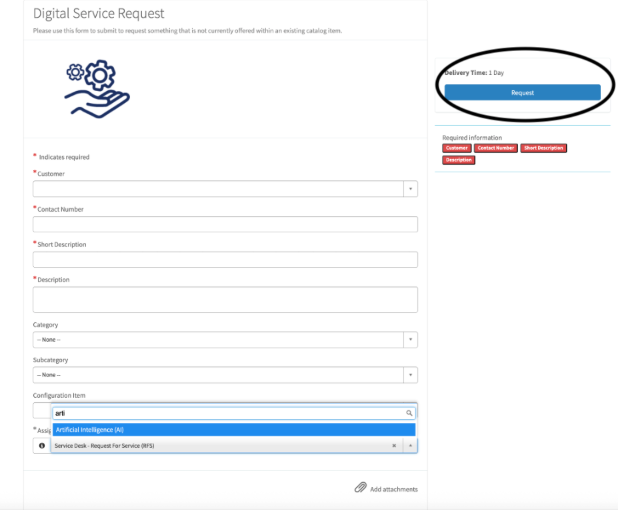
In the “Digital Service Request” page, enter your information. Your name under “Customer”, your contact number “Contact Number”. Provide “Short description” and detailed “Description” clearly explaining why you are reaching out to the AI team. Select “Artificial intelligence:” for “Assignment Group”. Upload any relevant document using the “Add attachments” link and submit the request by clicking the “Request button” on the right side of the page as shown below.
The AI team will get back to you as soon as possible.